
Learn what a .SI domain is, why it attracts AI projects and who it suits. Check the price and register it with support from the EUnet Hosting team.
Artificial intelligence is changing how security vulnerabilities are discovered and exploited. Recent research has shown that advanced AI models can greatly speed up the analysis of complex memory corruption flaws, even when those flaws have been in the software for more than a decade.
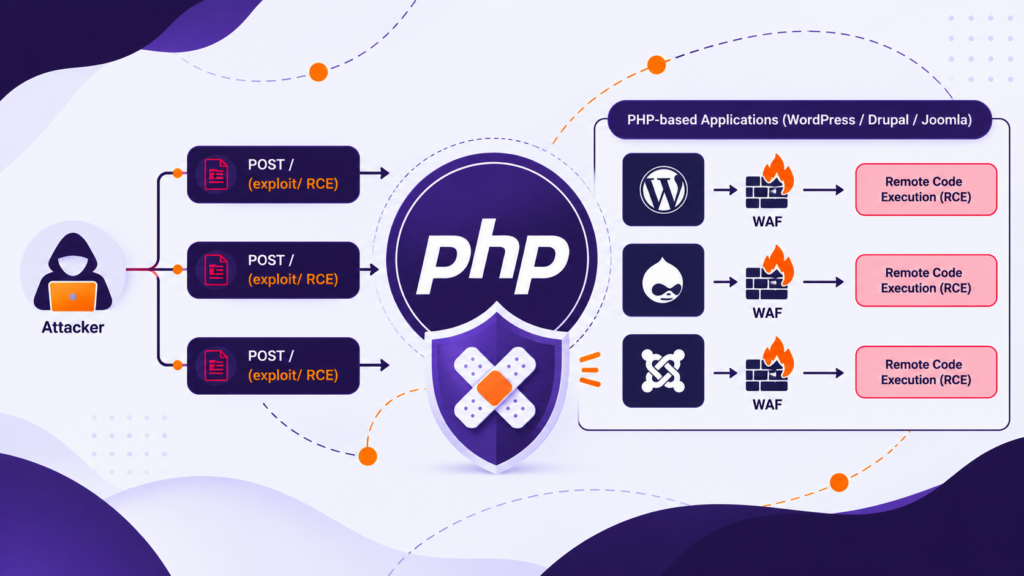
The discovery, named PHP2Shell, covers two critical vulnerabilities in PHP. Under certain conditions they allow unauthenticated Remote Code Execution (RCE) and access to sensitive data in the memory of the PHP process.
PHP powers roughly 70% of websites, including platforms such as WordPress, Drupal and Joomla. This does not mean that every one of those sites is directly vulnerable, but a flaw in one of the most widely used server-side technologies can have an extremely broad impact.
Of particular concern is that PHP2Shell is not a vulnerability in a WordPress plugin, theme or CMS application, but in the PHP engine itself. This means that even a fully updated web application can be exposed to attack if it runs on a vulnerable PHP version.
PHP2Shell covers several memory safety issues in the PHP engine, grouped under two CVE identifiers.
Both vulnerabilities have a CVSS v4.0 score of 9.2 (Critical):
This vulnerability is related to the way PHP handles Out-of-Memory situations while processing HTTP requests.
When PHP reaches the configured memory_limit, a fatal error can occur and execution can stop while certain internal structures are still being initialized.
In certain circumstances, the request cleanup mechanism may try to process those structures as if they were valid, which can lead to memory corruption.
Notably, a working exploit has been confirmed on Apache servers using mod_php, where the vulnerable code can be triggered while the HTTP request is being processed, before the application’s own PHP code runs.
Wiz Research also demonstrated that the memory of the PHP process can be accessed, potentially exposing session tokens, API keys, credentials and other sensitive data.
The second vulnerability concerns situations where, after a fatal error, PHP keeps references to memory structures that have already been freed.
If the same PHP worker continues to handle new requests, it may access that memory again.
This issue is known as Use-After-Free (UAF).
The researchers identified several related issues, including a fatal-error backtrace use-after-free and OPcache type confusion.
Depending on the configuration and execution flow, this behavior can lead to memory corruption and allow arbitrary code execution.
Wiz Research successfully demonstrated unauthenticated RCE on Drupal and WordPress applications using different exploit chains.
It is important to understand that CMS platforms are not the cause of these vulnerabilities. They were used as real-world environments to demonstrate flaws that exist at the PHP runtime level.
The story of the PHP2Shell vulnerabilities began long before their public disclosure on October 21, 2026.
As early as July 2004, security researcher Stefan Esser warned of a critical vulnerability in the way PHP manages memory. An issue related to the memory_limit mechanism could allow attackers to cause memory corruption and execute arbitrary code on the server (Remote Code Execution – RCE).
Although that vulnerability was fixed, similar problems in memory management and fatal error handling remained a challenge for PHP developers.
During an independent security audit in 2024, carried out by Quarkslab with the support of the PHP Foundation, one of the PHP core developers identified a new potential issue related to Out-of-Memory (OOM) situations.
The problem occurs when PHP stops processing a request at a moment when certain internal structures have not yet been fully initialized. In such circumstances memory can end up in an inconsistent state, which opens the door to memory corruption and potential exploitation.
Although the PHP security team recognized the risk, at the time there was no confirmed exploit demonstrating RCE. The solutions under consideration required significant changes to the PHP engine, with potential problems for backward compatibility, performance and existing extensions.
Because of the technical complexity, limited development resources and the lack of a confirmed exploit scenario, a final fix was not implemented in 2024.
More than two decades after the first warnings, AI-assisted security research has shown how serious the consequences of such flaws can be. What changed in 2026 was not the nature of the problem, but the ability to analyze complex memory corruption vulnerabilities much faster and turn them into working exploit chains.
PHP powers roughly 70% of websites.
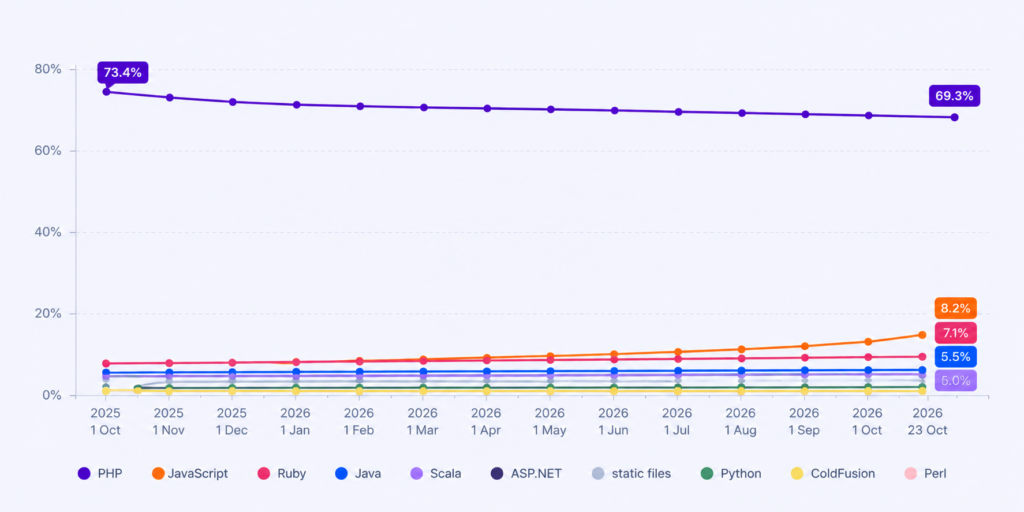
Source: https://w3techs.com
However, PHP’s market share does not mean that the same percentage of sites can actually be compromised.
The risk depends on the specific PHP version, SAPI configuration, how HTTP requests are handled, active PHP extensions and other security mechanisms.
Affected configurations include PHP-FPM, Apache with mod_php, php-cgi, LiteSpeed and other environments that run PHP code.
According to the official PHP security advisory, for mod_php configurations an exploit has been confirmed that triggers before the application starts processing the request.
Still, the fact that unauthenticated RCE has been demonstrated on popular CMS platforms, without any vulnerability in the application itself, makes PHP2Shell one of the more serious security problems in the PHP ecosystem.
Attacks have already started. Details of the vulnerabilities leaked before the official disclosure, and Cloudflare recorded exploit attempts targeting its customers’ sites on the day of the announcement. watchTowr recorded the first exploitation attempts on its sensors at roughly the same time the PHP security updates were released. That is why PHP updates should not be postponed.
The security and stability of our server infrastructure is one of our top priorities.
From the moment information about the PHP2Shell vulnerabilities was published, we have been actively monitoring official security advisories, the availability of security updates and the recommendations of the vendors whose software we use in our infrastructure.
On the servers we maintain, we applied the relevant PHP security updates as quickly as possible once they became available. We updated every PHP version that could be updated, including versions older than PHP 8.2, for which the PHP project has not released official fixed versions.
For the remaining environments under our maintenance, where a suitable update was not yet available, we carried out enhanced security monitoring and applied temporary mitigations to reduce the risk of exploitation.
On hosting servers with Imunify360 WAF enabled, we used additional security rules to detect and block known PHP2Shell exploit attempts.
Throughout this period we continuously tracked the availability of updated PHP packages, analyzed security events and adapted protective measures to the configuration of each server environment.
Although WAF rules and other mitigations reduced exposure to known attacks, our priority was to apply the relevant PHP security updates, because only an update containing the necessary security fixes removes the underlying vulnerabilities in the PHP engine.
On part of our shared hosting infrastructure we use CloudLinux, an enterprise Linux distribution that delivers security fixes through a mechanism known as security backporting.
Backporting is standard practice in enterprise Linux environments. Instead of moving to a new PHP version, the vendor applies the necessary security fixes directly to the existing, stable PHP build. This removes the identified vulnerabilities without unnecessary changes that could affect the compatibility and operation of existing websites and applications.
For example, in cPanel or through phpinfo() you may see PHP 8.2.34, even though the official upstream version that fixes the PHP2Shell vulnerabilities is PHP 8.2.35.
This does not mean the PHP version you are using is vulnerable. We have already applied the relevant CloudLinux security updates on our infrastructure, so the installed PHP build contains the necessary security fixes, even though the older PHP version number is still displayed.
For this reason, the actual security status of a PHP installation is not determined solely by the displayed version, but by checking the package build/release number, the changelog and the vendor’s official security advisories.
This way we ensure that customer websites and applications keep running on stable PHP versions, with security fixes applied and without changes that could break their compatibility.
In addition to the PHP security updates we applied, we have also kept session.upload_progress.enabled = Off on the servers we maintain, in line with the additional recommendations issued by the PHP security team on October 23, 2026. This setting will remain disabled until the next relevant PHP bugfix update is released and applied, which will fix an additionally identified RCE scenario (CVE-2026-115560).
The notice is available at: https://www.php.net/
You can follow up-to-date information about our infrastructure on the Network Status page.
Before updating, check which PHP version and installation your Linux or Windows server uses (Linux distribution packages or PHP under IIS), back up your configuration and choose the appropriate build.
To check the PHP version used by a specific website, temporarily create a file in its document root directory, for example phpinfo.php, with the following content:
<?php
phpinfo();
?>
Then open the following in your browser: https://vas-domen.rs/phpinfo.php
In the information displayed, check:
PHP Version – the active PHP version.Server API – how PHP is executed, e.g. FPM/FastCGI or Apache Handler.Loaded Configuration File – the path to the active php.ini file.session.upload_progress.enabled – whether the session upload progress feature is enabled.You can also run this check on Windows servers that use PHP through IIS.
Note: Be sure to delete the phpinfo.php file after the check, because a publicly accessible phpinfo() can reveal details about your server configuration.
| PHP | Minimum secure version |
|---|---|
| PHP 8.2 | 8.2.35 |
| PHP 8.3 | 8.3.36 |
| PHP 8.4 | 8.4.27 |
| PHP 8.5 | 8.5.12 |
| PHP 8.1 and older | no official release |
If you cannot install the relevant PHP update right away, you can apply temporary mitigations that reduce the risk from certain PHP2Shell exploit paths.
For CVE-2026-109619, disabling the session upload progress feature is recommended.
In the active php.ini file, set:
session.upload_progress.enabled = OffAlternatively, you can apply the setting through the relevant PHP-FPM pool or server configuration, provided it is loaded before HTTP requests are processed.
Setting it via ini_set() or a .user.ini file is not sufficient for this mitigation, because the vulnerable code can run before those settings take effect.
After changing the configuration, restart all relevant PHP workers.
It is also recommended to limit the size of HTTP requests and unnecessary file upload features, and to configure the post_max_size and upload_max_filesize directives appropriately.
For CVE-2026-109618, the PHP security team also mentions the option of temporarily applying memory_limit=-1 at the server level, with mandatory monitoring of available memory resources. This measure should be used with caution, because it removes the PHP memory limit but does not prevent all possible OOM scenarios.
None of these mitigations provides complete protection against the PHP2Shell vulnerabilities. Installing the relevant security patch remains the priority.
After updating, check that the server is actually using the patched PHP packages. On distributions that use security backports, the base PHP version number may remain unchanged, so you should also check the package changelog or the vendor’s security advisory.
On October 23, the PHP security team published an additional advisory about a potential RCE scenario (CVE-2026-115560), which can arise from a specific combination of the session.serialize_handler configuration and an active session upload progress mechanism.
Even after installing the PHP2Shell security update, we recommend keeping session.upload_progress.enabled = Off until the next relevant PHP bugfix release is published and applied.
In the active php.ini file, set:
session.upload_progress.enabled = OffApply the setting at the server level, and after the change restart the relevant PHP-FPM, Apache or other PHP worker processes.
If you already applied this mitigation following the October 21 recommendations, you do not need to configure it again. It simply needs to stay in place until the next relevant PHP update.
No server maintenance plan? Our technical team can help you check your PHP version and apply the necessary updates on your Linux or Windows cloud server.
Learn what a .SI domain is, why it attracts AI projects and who it suits. Check the price and register it with support from the EUnet Hosting team.
Sales:
Business hours: 09:00–17:00 on working days
sales@eunet.co.rs
Administration:
Business hours: 09:00–17:00 on working days
admin@eunet.co.rs
Support:
Business hours: 08:00–18:00 on working days,
10:00–15:00 on Saturdays
support@eunet.co.rs
© 2026 Mainstream Public Cloud Services d.o.o. Nušićeva 15, 11000 Belgrade, Serbia